> ## Documentation Index
> Fetch the complete documentation index at: https://docs.ipmideck.com/llms.txt
> Use this file to discover all available pages before exploring further.
# HPE iLO
> HPE iLO 4 / iLO 5에서 IPMI/DCMI over LAN을 활성화하여 ipmideck가 ProLiant 서버에 연결할 수 있도록 합니다.
**적용 대상:** HPE iLO 4와 iLO 5 (ProLiant 서버).
HPE iLO는 ipmideck의 **실험적** 공급업체입니다. 이 단계는 공식 HPE 문서와 실제 iLO 4에서
나왔습니다. **iLO 4**에서 IPMI over LAN은 일반적으로 **기본적으로 활성화**되어 있습니다.
**iLO 5**에서는 보안을 위해 **기본적으로 비활성화**되어 있으며 켜야 합니다 (아래 단계).
## iLO 5: IPMI/DCMI over LAN 활성화
브라우저에서 iLO IP 주소로 이동하여 iLO 관리자 자격 증명으로 로그인합니다.
왼쪽 탐색 창에서 **Security**를 클릭하고, **Access Settings** 탭을 연 다음, **Network**
섹션의 **연필 / 편집** 아이콘을 클릭합니다.
**IPMI/DCMI over LAN**을 체크하고 **Apply**를 클릭합니다. IPMI over LAN은 기본 포트
**623**을 사용합니다.
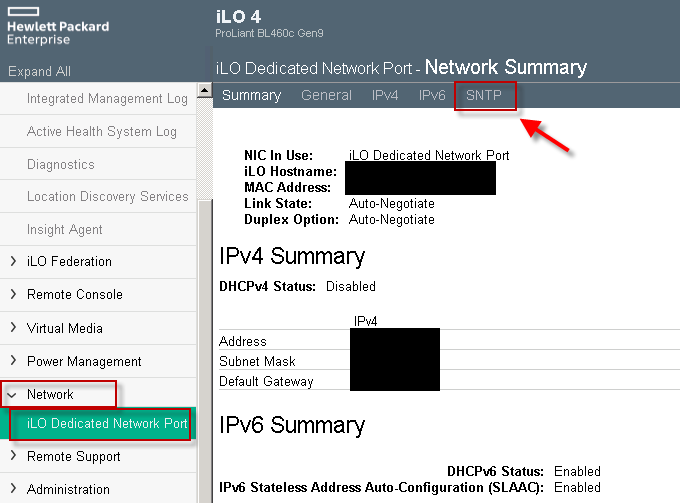
## iLO 4: 네트워크 주소 확인
iLO 4에서 IPMI over LAN은 일반적으로 이미 활성화되어 있습니다. 주로 iLO의 IP 주소가
필요합니다. **Network → iLO Dedicated Network Port**를 열고 **Network Summary**를 읽습니다.
 ## 검증
ipmideck를 실행할 호스트에서:
```bash theme={null}
ipmitool -I lanplus -H -U -P chassis status
```
**검토용으로 표시:** 경로는 iLO 4 (**Network** 탭. IPMI 보통 활성화)와 iLO 5
(**Security → Access Settings**. IPMI 기본적으로 비활성화) 간에 다릅니다. 이 단계에 의존하기
전에 특정 iLO 버전에 대해 검증하세요.
## 출처
[CITED: support.hpe.com, HPE iLO 5 IPMI User Guide](https://support.hpe.com/hpesc/public/docDisplay?docId=a00018321en_us) ·
[Guidelines for using iLO with IPMI or DCMI over LAN](https://support.hpe.com/hpesc/public/docDisplay?docId=a00026171en_us)
## 검증
ipmideck를 실행할 호스트에서:
```bash theme={null}
ipmitool -I lanplus -H -U -P chassis status
```
**검토용으로 표시:** 경로는 iLO 4 (**Network** 탭. IPMI 보통 활성화)와 iLO 5
(**Security → Access Settings**. IPMI 기본적으로 비활성화) 간에 다릅니다. 이 단계에 의존하기
전에 특정 iLO 버전에 대해 검증하세요.
## 출처
[CITED: support.hpe.com, HPE iLO 5 IPMI User Guide](https://support.hpe.com/hpesc/public/docDisplay?docId=a00018321en_us) ·
[Guidelines for using iLO with IPMI or DCMI over LAN](https://support.hpe.com/hpesc/public/docDisplay?docId=a00026171en_us)