> ## Documentation Index
> Fetch the complete documentation index at: https://docs.ipmideck.com/llms.txt
> Use this file to discover all available pages before exploring further.
# IBM IMM
> System x 서버용 IBM Integrated Management Module II (IMM2)에서 IPMI over LAN을 활성화합니다. 낮은 신뢰도, 사용 전에 하드웨어에서 검증하세요.
**낮은 신뢰도 가이드, 이 단계에 의존하기 전에 하드웨어에서 검증하세요.**
IBM IMM2 하드웨어는 레거시이며 (IBM은 2014년에 System x 라인을 Lenovo에 매각했습니다),
온라인 문서가 부족합니다. 정확한 웹 인터페이스 경로는 IMM2 펌웨어 버전에 따라
다릅니다. 이는 **높은 검토 우선순위**입니다. 모든 경로를 자신의 서버에 대해 확인하고
수정 사항을 보고하세요. 소유자 하드웨어 검증은 보류 중입니다.
**적용 대상:** IMM2 (Integrated Management Module II)가 있는 IBM System x 서버. 예를 들어
IBM x3650 M4와 x3550 M4.
IBM IMM은 ipmideck의 **실험적** 공급업체입니다.
## 단계
브라우저에서 IMM2 IP 주소로 이동하여 로그인합니다. 기본 자격 증명은
**USERID** / **PASSW0RD**입니다 ("PASSW0RD"의 **0**에 주의). 여전히 사용 중이면 즉시
변경하세요.
상단 메뉴에서 **IMM Management → Network Protocol Properties**로 이동합니다. Ethernet, SNMP,
DNS, …, **IPMI** 탭이 있는 페이지입니다.
**IPMI** 탭을 열고 **Allow IPMI access**를 체크한 다음, **Apply**를 클릭합니다.
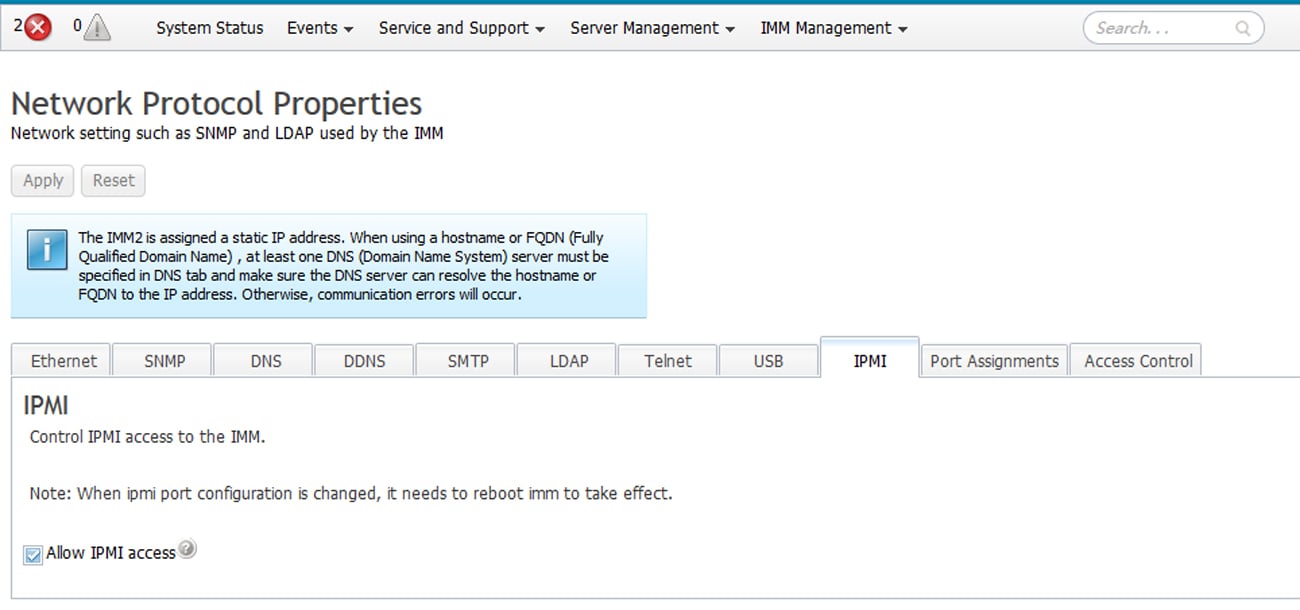 IPMI 포트 구성을 변경하면 적용되기 위해 **IMM 재부팅이 필요**합니다. IMM은 IPMI 탭에
이 알림을 표시합니다.
IBM의 문서는 다음과 같이 명시합니다: *"If no IPMI User IDs have been configured by the CMM, the
network port associated with the IPMI protocol will be closed."* 최소한 하나의 IPMI 사용자
ID가 구성되어 있는지 확인하세요. 그렇지 않으면 LAN 포트가 닫힌 채로 유지됩니다.
ipmideck를 실행할 호스트에서:
```bash theme={null}
ipmitool -I lanplus -H -U USERID -P chassis status
```
**검토용으로 표시:** IMM2 웹 UI 경로는 펌웨어 버전에 따라 다르며, IBM의 BMC 문서는
온라인에서 부족합니다. 전체 참조는
[IMM2 Configuration User's Guide (PDF)](https://public.dhe.ibm.com/systems/support/system_x_pdf/imm2_configurations_usersguide.pdf)입니다.
이 가이드에 의존하기 전에 모든 단계를 실제 하드웨어에 대해 검증하세요.
## 출처
[CITED: pubs.lenovo.com/imm2, Managing the IMM2 with IPMI](https://pubs.lenovo.com/imm2/dw1lm_t_managingtheimmwithipmi.html) ·
[IMM2 Configuration User's Guide (IBM)](https://public.dhe.ibm.com/systems/support/system_x_pdf/imm2_configurations_usersguide.pdf)
IPMI 포트 구성을 변경하면 적용되기 위해 **IMM 재부팅이 필요**합니다. IMM은 IPMI 탭에
이 알림을 표시합니다.
IBM의 문서는 다음과 같이 명시합니다: *"If no IPMI User IDs have been configured by the CMM, the
network port associated with the IPMI protocol will be closed."* 최소한 하나의 IPMI 사용자
ID가 구성되어 있는지 확인하세요. 그렇지 않으면 LAN 포트가 닫힌 채로 유지됩니다.
ipmideck를 실행할 호스트에서:
```bash theme={null}
ipmitool -I lanplus -H -U USERID -P chassis status
```
**검토용으로 표시:** IMM2 웹 UI 경로는 펌웨어 버전에 따라 다르며, IBM의 BMC 문서는
온라인에서 부족합니다. 전체 참조는
[IMM2 Configuration User's Guide (PDF)](https://public.dhe.ibm.com/systems/support/system_x_pdf/imm2_configurations_usersguide.pdf)입니다.
이 가이드에 의존하기 전에 모든 단계를 실제 하드웨어에 대해 검증하세요.
## 출처
[CITED: pubs.lenovo.com/imm2, Managing the IMM2 with IPMI](https://pubs.lenovo.com/imm2/dw1lm_t_managingtheimmwithipmi.html) ·
[IMM2 Configuration User's Guide (IBM)](https://public.dhe.ibm.com/systems/support/system_x_pdf/imm2_configurations_usersguide.pdf)