> ## Documentation Index
> Fetch the complete documentation index at: https://docs.ipmideck.com/llms.txt
> Use this file to discover all available pages before exploring further.
# HPE iLO
> Schakel IPMI/DCMI-over-LAN in op HPE iLO 4 / iLO 5 zodat ipmideck verbinding kan maken met je ProLiant-server.
**Van toepassing op:** HPE iLO 4 en iLO 5 (ProLiant-servers).
HPE iLO is een **Experimentele** leverancier voor ipmideck, deze stappen komen uit officiële HPE-
documentatie en een echte iLO 4. Op **iLO 4** is IPMI-over-LAN doorgaans **standaard
ingeschakeld**; op **iLO 5** is het **standaard uitgeschakeld** voor beveiliging en moet het worden aangezet
(stappen hieronder).
## iLO 5: schakel IPMI/DCMI over LAN in
Navigeer in een browser naar het iLO-IP-adres en log in met iLO-beheerders-
inloggegevens.
Klik in het linkernavigatiepaneel op **Security**, open het tabblad **Access Settings**, klik dan
op het **potlood- / bewerk**-icoon voor de sectie **Network**.
Vink **IPMI/DCMI over LAN** aan en klik op **Apply**. IPMI-over-LAN gebruikt de standaardpoort
**623**.
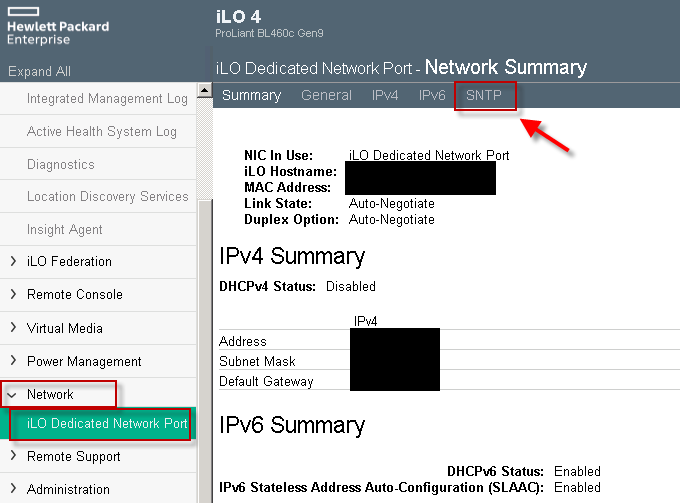
## iLO 4: bevestig het netwerkadres
Op iLO 4 is IPMI-over-LAN over het algemeen al ingeschakeld; je hebt vooral het IP-adres van iLO nodig.
Open **Network → iLO Dedicated Network Port** en lees de **Network Summary**.
 ## Verifiëren
Vanaf de host die ipmideck gaat draaien:
```bash theme={null}
ipmitool -I lanplus -H -U -P chassis status
```
**Markering ter beoordeling:** het pad verschilt tussen iLO 4 (een **Network**-tabblad; IPMI meestal
ingeschakeld) en iLO 5 (**Security → Access Settings**; IPMI standaard uitgeschakeld). Verifieer
tegen je specifieke iLO-versie voordat je op deze stappen vertrouwt.
## Bron
[CITED: support.hpe.com, HPE iLO 5 IPMI User Guide](https://support.hpe.com/hpesc/public/docDisplay?docId=a00018321en_us) ·
[Guidelines for using iLO with IPMI or DCMI over LAN](https://support.hpe.com/hpesc/public/docDisplay?docId=a00026171en_us)
## Verifiëren
Vanaf de host die ipmideck gaat draaien:
```bash theme={null}
ipmitool -I lanplus -H -U -P chassis status
```
**Markering ter beoordeling:** het pad verschilt tussen iLO 4 (een **Network**-tabblad; IPMI meestal
ingeschakeld) en iLO 5 (**Security → Access Settings**; IPMI standaard uitgeschakeld). Verifieer
tegen je specifieke iLO-versie voordat je op deze stappen vertrouwt.
## Bron
[CITED: support.hpe.com, HPE iLO 5 IPMI User Guide](https://support.hpe.com/hpesc/public/docDisplay?docId=a00018321en_us) ·
[Guidelines for using iLO with IPMI or DCMI over LAN](https://support.hpe.com/hpesc/public/docDisplay?docId=a00026171en_us)