> ## Documentation Index
> Fetch the complete documentation index at: https://docs.ipmideck.com/llms.txt
> Use this file to discover all available pages before exploring further.
# HPE iLO
> 在 HPE iLO 4 / iLO 5 上启用 IPMI/DCMI-over-LAN,以便 ipmideck 能连接到你的 ProLiant 服务器。
**适用于:** HPE iLO 4 和 iLO 5(ProLiant 服务器)。
HPE iLO 对 ipmideck 而言是**实验性**厂商,这些步骤来自 HPE 官方
文档和一台真实的 iLO 4。在 **iLO 4** 上,IPMI-over-LAN 通常**默认
启用**;在 **iLO 5** 上,出于安全考虑它**默认禁用**,必须开启
(步骤如下)。
## iLO 5:启用 IPMI/DCMI over LAN
在浏览器中,导航到 iLO IP 地址,并用 iLO 管理员凭据
登录。
在左侧导航窗格中点击 **Security**,打开 **Access Settings** 选项卡,然后
点击 **Network** 部分的**铅笔 / 编辑**图标。
勾选 **IPMI/DCMI over LAN** 并点击 **Apply**。IPMI-over-LAN 使用默认端口
**623**。
## iLO 4:确认网络地址
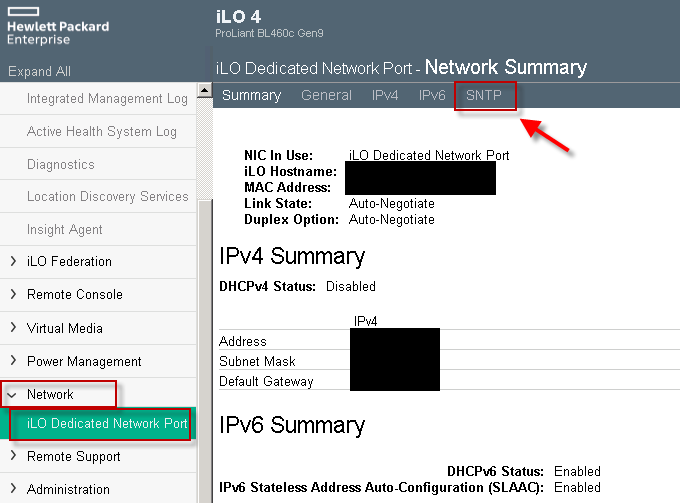
在 iLO 4 上,IPMI-over-LAN 通常已经启用;你主要需要 iLO 的 IP 地址。
打开 **Network → iLO Dedicated Network Port** 并读取 **Network Summary**。
 ## 验证
从将运行 ipmideck 的主机:
```bash theme={null}
ipmitool -I lanplus -H -U -P chassis status
```
**标记以供审查:** 路径在 iLO 4(一个 **Network** 选项卡;IPMI 通常
启用)和 iLO 5(**Security → Access Settings**;IPMI 默认禁用)之间不同。请在依赖
这些步骤之前针对你的特定 iLO 版本验证。
## 来源
[CITED: support.hpe.com, HPE iLO 5 IPMI User Guide](https://support.hpe.com/hpesc/public/docDisplay?docId=a00018321en_us) ·
[Guidelines for using iLO with IPMI or DCMI over LAN](https://support.hpe.com/hpesc/public/docDisplay?docId=a00026171en_us)
## 验证
从将运行 ipmideck 的主机:
```bash theme={null}
ipmitool -I lanplus -H -U -P chassis status
```
**标记以供审查:** 路径在 iLO 4(一个 **Network** 选项卡;IPMI 通常
启用)和 iLO 5(**Security → Access Settings**;IPMI 默认禁用)之间不同。请在依赖
这些步骤之前针对你的特定 iLO 版本验证。
## 来源
[CITED: support.hpe.com, HPE iLO 5 IPMI User Guide](https://support.hpe.com/hpesc/public/docDisplay?docId=a00018321en_us) ·
[Guidelines for using iLO with IPMI or DCMI over LAN](https://support.hpe.com/hpesc/public/docDisplay?docId=a00026171en_us)