> ## Documentation Index
> Fetch the complete documentation index at: https://docs.ipmideck.com/llms.txt
> Use this file to discover all available pages before exploring further.
# IBM IMM
> 在 IBM Integrated Management Module II(IMM2)上为 System x 服务器启用 IPMI-over-LAN。低置信度,使用前请在你的硬件上验证。
**低置信度指南,在依赖这些步骤之前请在你的硬件上验证。**
IBM IMM2 硬件已属遗留(IBM 于 2014 年将 System x 产品线出售给 Lenovo),在线
文档稀少。确切的 Web 界面路径取决于 IMM2 固件
版本。这是**高审查优先级**,请针对你自己的服务器确认每条路径,
并报告更正。所有者硬件验证尚待进行。
**适用于:** 带 IMM2(Integrated Management Module II)的 IBM System x 服务器,例如
IBM x3650 M4 和 x3550 M4。
IBM IMM 对 ipmideck 而言是**实验性**厂商。
## 步骤
在浏览器中,导航到 IMM2 IP 地址并登录。默认凭据为
**USERID** / **PASSW0RD**(注意 "PASSW0RD" 中的**零**)。如果它们仍在
使用中,请立即更改。
从顶部菜单,转到 **IMM Management → Network Protocol Properties**,该页面
带有 Ethernet、SNMP、DNS、…、**IPMI** 的选项卡。
打开 **IPMI** 选项卡并勾选 **Allow IPMI access**,然后点击 **Apply**。
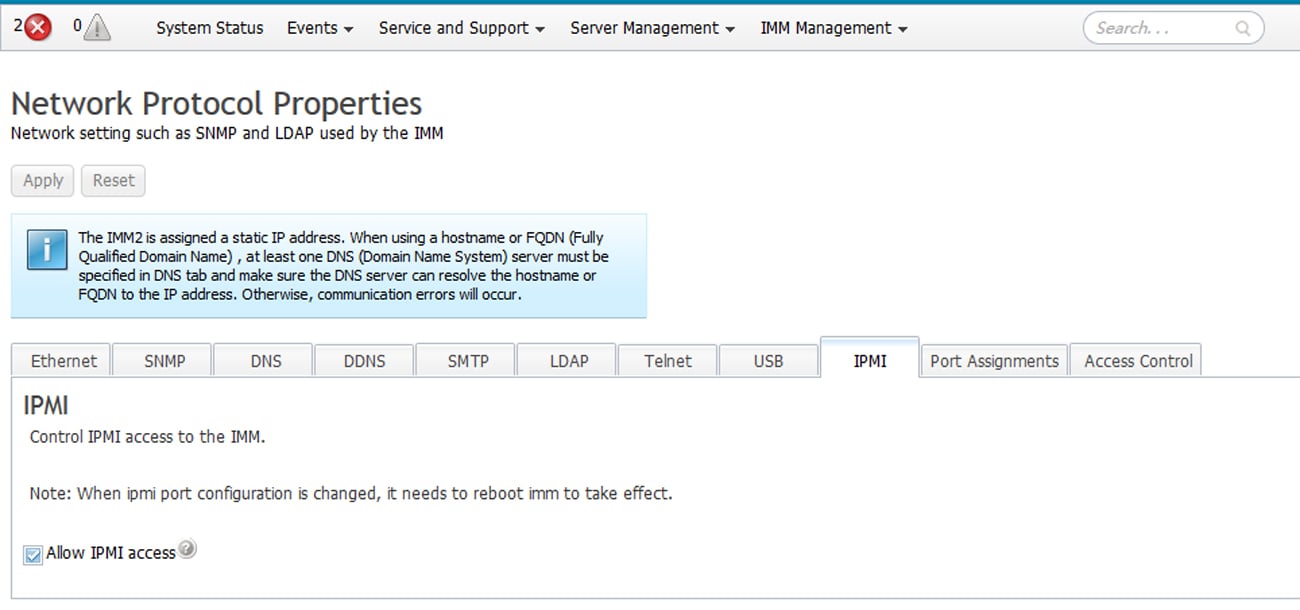 更改 IPMI 端口配置**需要重启 IMM**才能生效,
IMM 会在 IPMI 选项卡上显示此提醒。
IBM 的文档指出:*"If no IPMI User IDs have been configured by the CMM, the
network port associated with the IPMI protocol will be closed."* 请确保至少配置了一个
IPMI 用户 ID,否则 LAN 端口会保持关闭。
从将运行 ipmideck 的主机:
```bash theme={null}
ipmitool -I lanplus -H -U USERID -P chassis status
```
**标记以供审查:** IMM2 Web UI 路径因固件版本而异,而且 IBM 的 BMC
文档在线稀少。完整参考是
[IMM2 Configuration User's Guide (PDF)](https://public.dhe.ibm.com/systems/support/system_x_pdf/imm2_configurations_usersguide.pdf)。
在依赖本指南之前,请针对真实硬件验证每个步骤。
## 来源
[CITED: pubs.lenovo.com/imm2, Managing the IMM2 with IPMI](https://pubs.lenovo.com/imm2/dw1lm_t_managingtheimmwithipmi.html) ·
[IMM2 Configuration User's Guide (IBM)](https://public.dhe.ibm.com/systems/support/system_x_pdf/imm2_configurations_usersguide.pdf)
更改 IPMI 端口配置**需要重启 IMM**才能生效,
IMM 会在 IPMI 选项卡上显示此提醒。
IBM 的文档指出:*"If no IPMI User IDs have been configured by the CMM, the
network port associated with the IPMI protocol will be closed."* 请确保至少配置了一个
IPMI 用户 ID,否则 LAN 端口会保持关闭。
从将运行 ipmideck 的主机:
```bash theme={null}
ipmitool -I lanplus -H -U USERID -P chassis status
```
**标记以供审查:** IMM2 Web UI 路径因固件版本而异,而且 IBM 的 BMC
文档在线稀少。完整参考是
[IMM2 Configuration User's Guide (PDF)](https://public.dhe.ibm.com/systems/support/system_x_pdf/imm2_configurations_usersguide.pdf)。
在依赖本指南之前,请针对真实硬件验证每个步骤。
## 来源
[CITED: pubs.lenovo.com/imm2, Managing the IMM2 with IPMI](https://pubs.lenovo.com/imm2/dw1lm_t_managingtheimmwithipmi.html) ·
[IMM2 Configuration User's Guide (IBM)](https://public.dhe.ibm.com/systems/support/system_x_pdf/imm2_configurations_usersguide.pdf)