HPE iLO is a Monitoring-only vendor for ipmideck — sensors, power, SEL, and FRU work,
but ipmideck does not control iLO fans (iLO exposes no IPMI fan-control interface). These
steps (from official HPE documentation and a real iLO 4) enable IPMI-over-LAN so ipmideck
can connect. On iLO 4 IPMI-over-LAN is typically enabled by
default; on iLO 5 it is disabled by default for security and must be turned on
(steps below).
iLO 5: enable IPMI/DCMI over LAN
1
Open the iLO web interface
In a browser, navigate to the iLO IP address and log in with iLO administrator
credentials.
2
Security → Access Settings → Network
In the left navigation pane click Security, open the Access Settings tab, then
click the pencil / edit icon for the Network section.
3
Enable IPMI/DCMI over LAN
Tick IPMI/DCMI over LAN and click Apply. IPMI-over-LAN uses the default port
623.
iLO 4: confirm the network address
On iLO 4, IPMI-over-LAN is generally enabled already; you mainly need the iLO’s IP address. Open Network → iLO Dedicated Network Port and read the Network Summary.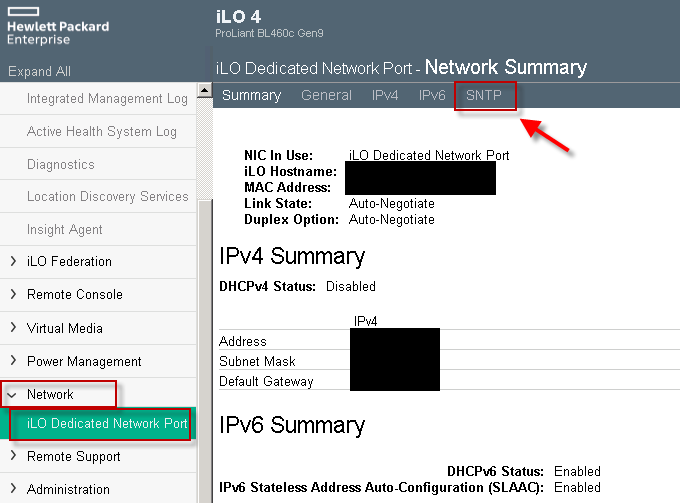
iLO 4 → Network → iLO Dedicated Network Port → Network Summary. The IPv4 Summary block holds the iLO address, subnet, and gateway you need (the red highlight on the SNTP tab is incidental to this capture).
Verify
From the host that will run ipmideck:Flag for review: the path differs between iLO 4 (a Network tab; IPMI usually
enabled) and iLO 5 (Security → Access Settings; IPMI disabled by default). Verify
against your specific iLO version before relying on these steps.